
Integrated assessment projects (or merged dashboards, as they are sometimes known) are a mechanism by which a set of independent 360 multi-rater assessment projects is integrated/merged during the Assessment phase, so that raters receive only one assessment link email from which they are invited to rate any number of assessees via various, unrelated model questionnaires.
An example of an Integrated Assessment Project
Assume a requirement that all direct reports rate their line managers' feedback, and all peers rate their own and one another's information sharing. Assume also that a model (with questionnaire(s)) that assesses feedback exists, and a separate model/questionnaire combination exists to rate information sharing.
Using (non-integrated) 360 assessment projects, all direct reports will receive emails with links to the feedback assessment, and all peers will receive emails with links to the information sharing assessment. But most direct reports are also peers. Everyone who is both a direct report and a peer will receive two emails containing assessment invitation links.
By integrating the feedback and information sharing assessment projects, every direct report and every peer, even those who are both, will receive only 1 assessment invitation email. When a rater who is both a direct report and a peer clicks the assessment link, the displayed dashboard will have both Direct Manager and Peer Assessments:
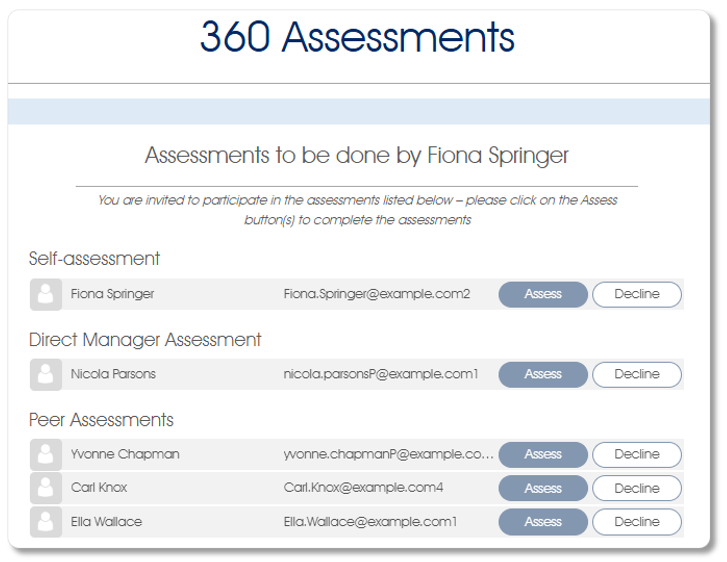
When rater Fiona Springer assesses Direct Manager Nicola Parsons, a feedback questionnaire will open. An information-sharing questionnaire will be presented when Fiona Springer clicks the Assess button for Self-assessment, and when a Peer (eg. Carl Knox) is assessed.
Preparing the Assessment Projects for Integration
Preparing each of the 360 assessment projects, which will be integrated at the Assessment phase, does not differ in any way from the preparation of an ordinary, standalone 360 assessment:
- Model - define a model with the requisite:
- Constructs and questions;
- Questionnaire(s);
- Settings and report(s);
- Translations to other languages - if required.
- Assessment Project - create a 360 multi-rater assessment project, including its:
- Starting the Assessment - perform the operations that precede the assessment phase:
- Activate the project;
- Rater nomination phase - build the necessary rater lists;
- Manager review phase - if required.
Do all of the above for each of the 360 assessment projects which will form part of the Integrated assessment project.
Preparing to Integrate the Assessment Projects
Before launching the Assessment phase of any of the 360 assessment projects which will form part of the Integrated assessment project, ensure that the following settings have been correctly assigned:
- Ensure that the Message interval (days) setting in the Client profile has been correctly set; usually your Mindset Partner will update this setting on your behalf.
- Set the Integrated project to Yes in the Assessment settings for each 360 assessment project which will form part of the Integrated assessment project.
Administering an Integrated Assessment Project
When all the above preparations have been completed, launch the Assessment phase of each assessment which forms part of the Integrated assessment project. Note that all of them must be launched within the number of days specified in the Message interval (days) setting, but allow a few minutes to lapse between the launches to give the system time to build and update the integrated dashboard.
Invitation emails will be sent during the Assessment phase launch of the first assessment project. Simultaneously, the integrated assessment dashboard will be created and the Integrated 360 assessment message cycle (of Message interval (days) in length) will be initiated.
Subsequent launches within the message cycle lifespan will update the integrated dashboard. The only invitation emails, if any, will be sent to participants who are raters in the newly launched assessment, but have not yet received invitations as they are not raters in the previously launched assessments.
The sending of reminder emails operates the same way, controlled via the Integrated 360 assessment message cycle, as described in the sending of invitation emails above.
Integration of the assessment projects is confined to the Assessment phase of each. As noted above, the Rater nomination and Manager review phases of the assessments (which form part of the Integrated assessment project) are administered entirely independently of one another. Similarly, the component assessments are closed independently.
It is vitally important that any assessment project configured with Integrated project set to Yes be closed, or its Integrated project option reset as soon as the need for the integrated dashboard functionality has passed. This prevents any unclosed, previously integrated project from being merged, accidentally, into the next integrated assessment project initiated by the same client.
| For more information, click on a sub-menu item at the top of the page⇑ or in the right margin⇒ |